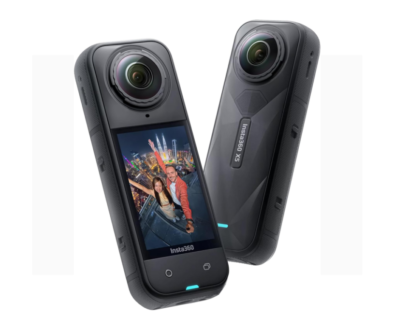
360 camera technology has seen a remarkable rise in popularity over the past few years. These cameras, which capture a full sphere of view around the lens, are now used by travellers, real estate agents, content creators, and even educators.
Unlike traditional cameras that only record what is directly in front of them, 360 cameras let users immerse themselves in any direction—up, down, or all around.
One reason for this growth is the rise of social media and virtual reality. Platforms like YouTube and Facebook now support 360 videos, giving creators a new way to share their world. For example, travel vloggers can take their followers on a full 360-degree tour of a city street, a mountain hike, or a festival.
Viewers can move their phones or drag the screen to look in any direction, making the experience feel more real and interactive.
Another big driver is the real estate industry. With a 360 camera, agents can create virtual tours of homes. Instead of only looking at static photos, potential buyers can “walk” through the rooms, see the ceiling, and check every corner.
This saves time for both buyers and sellers, and it can help properties sell faster.
Education is also seeing benefits. Teachers use 360 cameras to give students a front-row seat in places they can’t visit, like historical sites or science labs. For example, a biology teacher might use a 360 camera inside a greenhouse to let students explore the plants from all angles.
But the technology is not just about video. Many 360 cameras also capture high-resolution still photos. Event photographers use them to shoot weddings, parties, or concerts, making sure nothing is left out of the picture.
Top Innovations In 360 Cameras
As 360 cameras have become more popular, manufacturers have rushed to improve their features and make them easier to use. Some of the most exciting innovations in recent years include:
1. Real-time Stitching
Early 360 cameras recorded video from two or more lenses, which then had to be “stitched” together using a computer. This process could take hours and often left visible lines where the images joined. Today, many cameras perform stitching in real time, meaning users can see their 360 photo or video instantly, with almost no visible seams.
For example, the Insta360 One X2 and GoPro Max can process footage inside the camera. This saves time and makes 360 content more accessible, even for beginners.
2. Improved Image Quality
Image quality has improved dramatically. Modern 360 cameras now shoot in 5. 7K or even 8K resolution, which means the video looks sharp and clear even when you zoom in. This is especially important for VR headsets, where low-quality video can look pixelated and break immersion.
Some cameras use advanced sensors and better lenses to handle low-light situations, which used to be a problem for 360 cameras. The Ricoh Theta Z1, for instance, has larger sensors for better night photography.
3. Flowstate Stabilization
One of the biggest challenges in 360 video is stabilizing the image. Since the camera records in every direction, even a small shake is noticeable. FlowState stabilization, found in cameras like the Insta360 One R, uses software to smooth out bumps and vibrations.
This is especially useful for action sports, biking, or any handheld shooting.
4. Ai-powered Editing
Editing 360 video used to be complex, but new cameras now offer AI-powered tools. These can automatically pick highlights, track moving objects, or let you reframe your video after shooting. For example, Insta360’s “Shot Lab” lets you create effects like “tiny planet” or “fly-through” with one click.
This feature is a game-changer for beginners who want great results without hours of editing. It also helps professionals save time on complex projects.
5. Waterproof And Rugged Designs
Many new 360 cameras are built for adventure. They are waterproof, dustproof, and shock-resistant, so you can take them surfing, skiing, or hiking without worry. The GoPro Max can go underwater up to 5 meters, while the Insta360 One X2 has a tough body that handles rain and splashes.
6. Live Streaming Support
Live streaming is now a key feature. With just a phone and a 360 camera, anyone can broadcast live in 360 degrees to YouTube or Facebook. This is popular for concerts, sports, and events where viewers want to look around the scene in real time.
A practical example: during a music festival, organizers can set up a 360 camera on stage. Fans at home use their phone to look at the crowd, the band, or the sky—creating a sense of being there.

What To Look For In A 360 Camera
Choosing the right 360 camera depends on your needs, but there are a few important things to consider:
Resolution
Higher resolution gives you sharper video and photos. For most people, a 5. 7K camera is a good starting point. If you plan to use a VR headset, look for 8K or higher.
Battery Life
Shooting in 360 uses a lot of power. Some cameras last for 40–60 minutes of continuous video, while others offer swappable batteries. Think about your typical shooting sessions and whether you need extra batteries.
Software And App Quality
A good mobile app makes it easy to transfer, edit, and share your 360 content. Check if the camera’s app is user-friendly, stable, and available for your device (iOS or Android). Some cheaper cameras come with limited or buggy apps, which can be frustrating.
Stitching Quality
Seams in 360 photos and videos can be distracting. Look for cameras with good stitching algorithms and minimal visible lines. Read user reviews and watch sample footage before you buy.
Audio Performance
360 video is more immersive with good audio. Some cameras have built-in microphones that capture sound from all directions, or you can attach an external mic. This is important for vloggers, event shooters, and anyone who wants to make viewers feel “inside” the scene.
Accessories And Mounts
Consider what accessories are available. Selfie sticks, tripod mounts, and waterproof cases can make a big difference, especially for travel and action shots.
Price
Prices range from under $200 for basic models to over $1,000 for professional gear. Decide what features matter most, and remember that a high price does not always mean a better camera for your needs.
Common Mistakes When Using 360 Cameras
Even with the best technology, beginners often make simple mistakes that spoil their footage or photos. Here are a few to watch out for:
Standing Too Close to the Camera: Because the lens captures everything, standing too close can make faces look stretched or distorted. Try to keep at least 1 meter (about 3 feet) from the camera for natural-looking shots.
Ignoring Lighting: 360 cameras need good, even light. Avoid shooting with strong light behind you or in very dark rooms.
Forgetting About the Camera’s Position: Since everything is visible, hiding the camera or yourself can be difficult. Use a selfie stick or tripod, and try to keep your body out of the way unless you want to be in the shot.
Not Cleaning the Lenses: 360 cameras have two or more wide lenses, which easily get fingerprints or smudges. Clean them before every shoot for the best image quality.
Neglecting Audio: Don’t assume the built-in mic will capture good sound. Wind noise, people talking nearby, or echoes can all affect the recording. Consider using an external mic if possible.

Non-obvious Insights For Better 360 Content
Many beginners focus only on the camera’s technical features, but there are some less obvious tips that can make a big difference:
Plan Your Story: 360 video is not just about showing everything. Think about where you want viewers to look and guide their attention. Use movement, sound, or objects to draw the eye.
Use Motion Carefully: Fast spinning or sudden movements can make viewers feel dizzy in VR. Move the camera smoothly, or let the action come to you.
Leverage “Invisible” Selfie Sticks: Many 360 cameras use special selfie sticks that are automatically erased from the final video. This creates a floating-camera effect, perfect for walking tours or action shots. Not everyone knows about this feature, but it adds a lot of wow-factor to your footage.
Experiment with Different Mounts: You can attach a 360 camera to helmets, cars, or drones for creative angles. Some users even put the camera on a dog’s harness for a playful, unique view.
The Future Of 360 Cameras
The next few years will bring even more changes. Companies are working on smaller, lighter cameras, better battery life, and improved AI editing. We may see 360 cameras built into smartphones, or new ways to share 360 content in real-time over 5G networks.
Virtual reality is growing, too. As VR headsets become more affordable, 360 cameras will be used for training, events, and even remote work. Imagine attending a live conference or touring a museum from your home, seeing everything around you in real time.
360 cameras are also being used in security, journalism, and science. For example, researchers use them to study animal behaviour, and journalists use them to report from dangerous locations without being in the middle of the action.
Final Thoughts
360 cameras have changed the way we capture and share our world. Whether you’re a hobbyist, a professional, or just curious, there’s never been a better time to explore this technology. With new features and creative tools, you can tell stories in ways that were impossible just a few years ago.
Remember to think first about what you want to capture, then choose the camera that fits your needs, and experiment with different techniques. The more you practice, the better your results will be. And above all, have fun—because the best 360 content is often the most unexpected.